
Building a Blog Pipeline with Claude Code and Voice Memos
So, I built a pipeline yesterday for my blog and I want to share the process. You might be wondering why I need a ‘pipeline for my blog’, wouldn’t I just write posts as I have time? The truth is I can come up with topics that I’d like to talk about faster than I can actually sit down to write them. For the past year I’ve been trying to get better at going from ‘I have an idea’ to ‘here’s a published post about it.’ This post is about the system I built to make that easier.
I recently organized my posts by ‘inbox’, ’next’, and ‘posted’ - here are the counts:
Blog post folders: inbox, next, and posted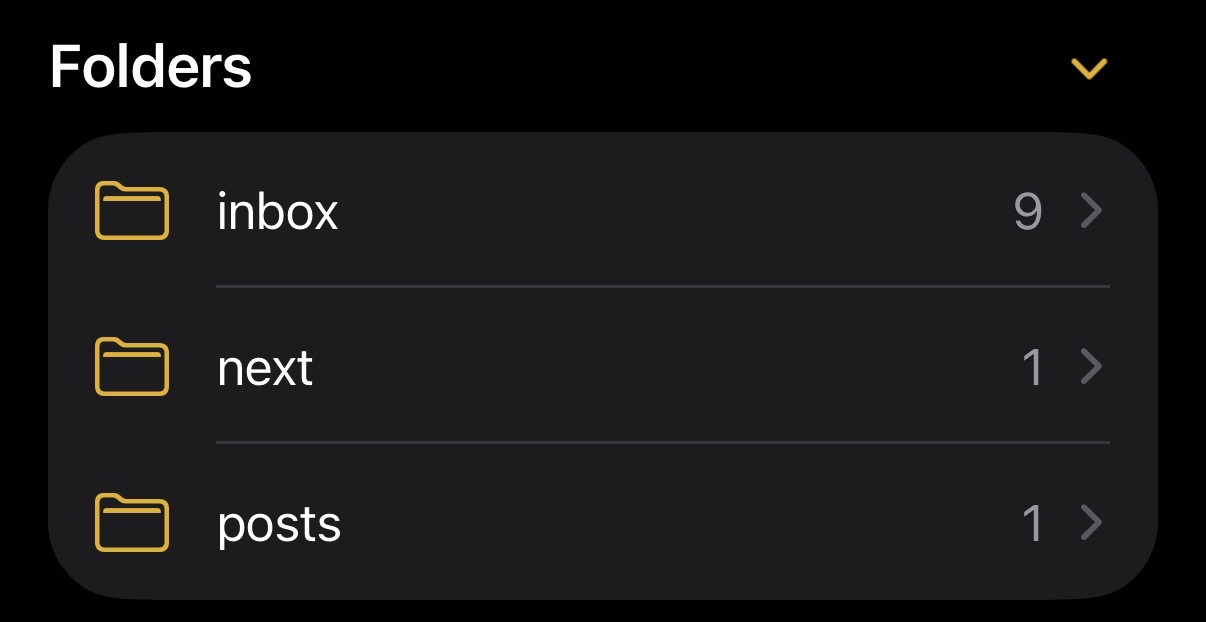
What parts are high friction currently?
- Collecting screenshots
- Conducting experiments or building software
- Pulling graphics from collected raw data like in the Aider Polyglot Post
- Outlining the structure of the post
Most of these can be achieved with some light-automation with agents, so that’s what we’re going to build!
The Idea: Use Claude Code + Voice Memos as a Pipeline
Instead of fighting the bottleneck of turning my voice memos into usable drafts I decided to do what any software developer would do when faced with a universal problem and build custom software! Joking aside, I was inspired by some of the stories I’d seen with ClawdBot/MoltBot/OpenClaw, but I’m not ready to hook up everything to an agent just yet, so this is an experiment in smaller automations as well as a tool to help me write.
As part of this process I tried a few different technologies, most of which I was familiar with, but also hadn’t fully explored the limits of (and still haven’t). All around, the stack was built around proving out the workflow and capabilities with the subscriptions I’m already paying for. For example, I limited myself to coding with Claude Code and Claude Cowork using Opus 4.6 to better understand how these tools interact with each other. Since last August, I’ve favored Codex for coding projects so this was a chance to review the progress in Anthropic’s tools. I also setup a claude background agent for the first time with the goal of increasing this type of background agent use in future projects. For transcription I chose ElevenLabs Scribe V2 Speech-to-Text model as I have credits included in my monthly subscription and I’m looking at using some of their generation products this year.
Here are some things we were able to get working (we’ll probably need to improve these)
- Collecting screenshots
- Transcribing voice memos into workable text
- Creating a structured outline of the post based on transcripts
Eventually, I’d like the agent to do more magic behind the scenes, some ideas I’ll be trying are:
- Autonomously running experiments through tools like Codex and Claude Code
- Identifying key graphics needed for the post outline and then pulling them from the available data
Here’s what I ended up with for version 1:
CAPTURE               TRANSCRIBE              PRE-PROCESS            DRAFT
┌─────────────┐      ┌──────────────┐       ┌────────────────┐    ┌──────────┐
│  Voice      │  →   │  ElevenLabs  │  →    │  Agent: Parse  │ → │  Human   │
│  Memos      │      │  Scribe v2   │       │  + Outline     │   │  Create  │
│  + Links    │      │              │       │                │   │  Draft   │
└─────────────┘      └──────────────┘       └────────────────┘    └──────────┘
   QUEUE                 QUEUE                   QUEUE               QUEUE
audio-notes/            output/               output/             output/
<slug>/                 transcribe/           outline/            draft/
                        <slug>/               <slug>/             <slug>/


REVIEW                 COLLECT                PUBLISH
┌──────────────┐      ┌──────────────┐       ┌─────────────────┐
│  Agent:      │      │  Playwright  │       │  Move to site   │
│  Review &    │  →   │  + oEmbed +  │  →    │                 │
│  Callouts    │      │  Cowork      │       │ content/posts/  │
└──────────────┘      └──────────────┘       │ <slug>/         │
  QUEUE                 QUEUE                 └─────────────────┘
output/              output/
review/              collect/
<slug>/              <slug>/
Step 1 - Capture: I was already capturing ideas and thoughts through voice memo on my phone, but sadly, the built-in transcription feature still struggles with a lot of the software related terms I use. So, I needed to get them to a device that could call a transcription endpoint. So we built a shortcut to send the voice memos to. This is a feature I wasn’t aware of, but you can use the built in share feature to send files/media/text as input for your shortcuts. We use this to save our voice memos to a blog-specific folder in iCloud. The user is prompted for the folder name (in this case it is cowork-blog-automation) and the files are synced over to my macbook.
This took some tinkering to get right and there are still frictions in using the system. Here are some notes if you want to setup a similar automation:
- On the target computer you have to mark the folder as ‘downloaded all the time’ otherwise icloud just keeps a stub
- If you use text input for the save location you have to remember where you saved the last file which can be difficult if you’re working on multiple posts/ideas at once
- I had Claude generate step by step instructions for setting this up that were detailed enough to follow and I was able to chat with it as I went to clarify settings I wasn’t familiar with
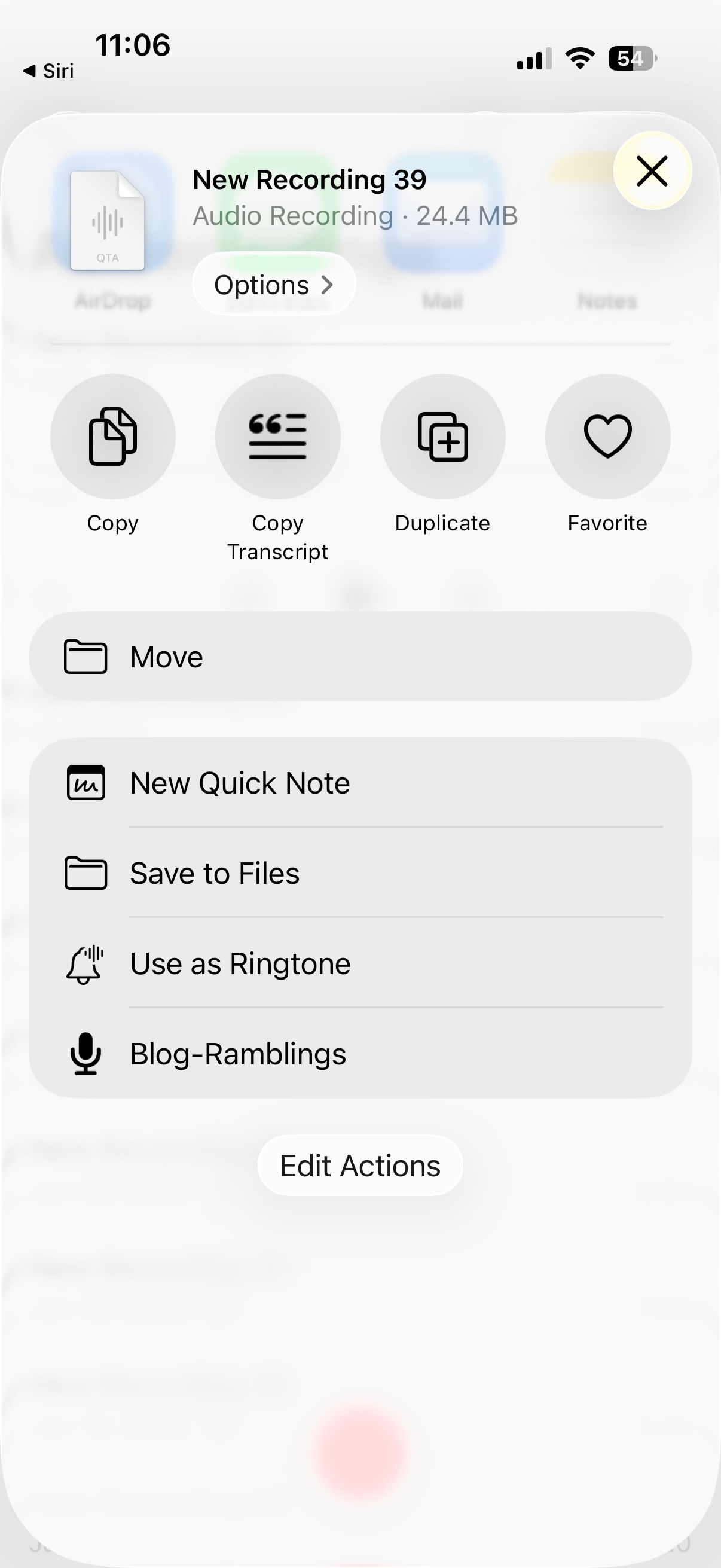
iOS Shortcut for saving voice memos to iCloud Drive
Step 2 — Transcribe: On my macbook I now have a job that runs every 15 minutes and it syncs the audio-notes folder from iCloud to my blog’s pipeline folder. It then calls out to Scribe v2 to get a transcript (about 1 cent per memo) and saves that for processing.
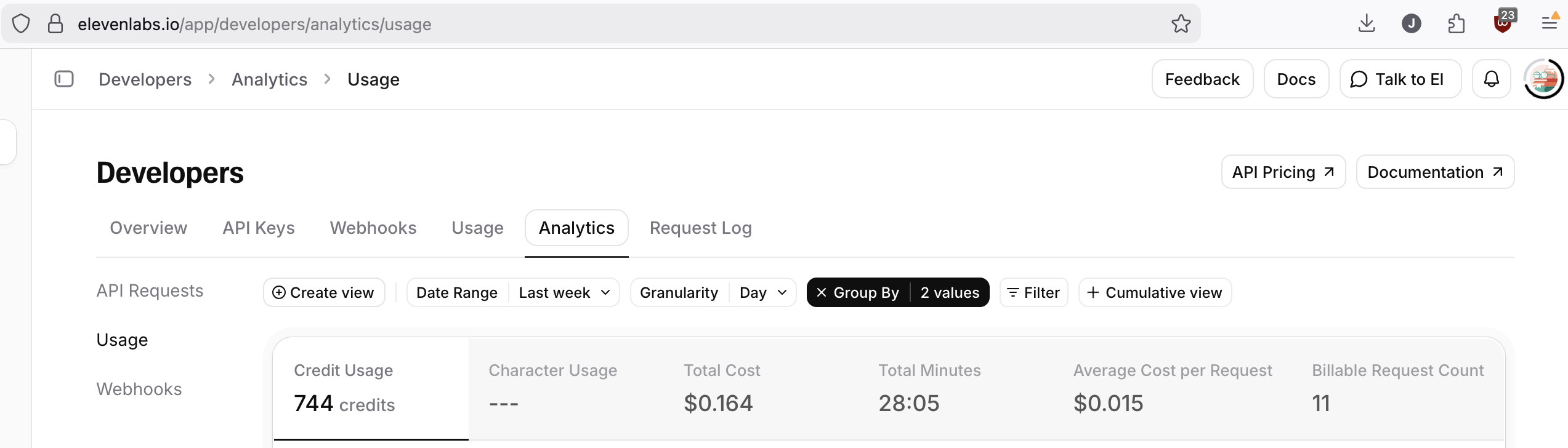
ElevenLabs Scribe v2 usage: 28 minutes across 11 requests for $0.16
One thing that excites me about this transcription is I expect the cost to continue to drop + accuracy improve so that by this time next year I should be able to transcribe 2 hours of ’thought’ per day every day for a whole year and it would only cost ~$40. This is with a 10x improvement in cost, but we could see even more of a reduction.
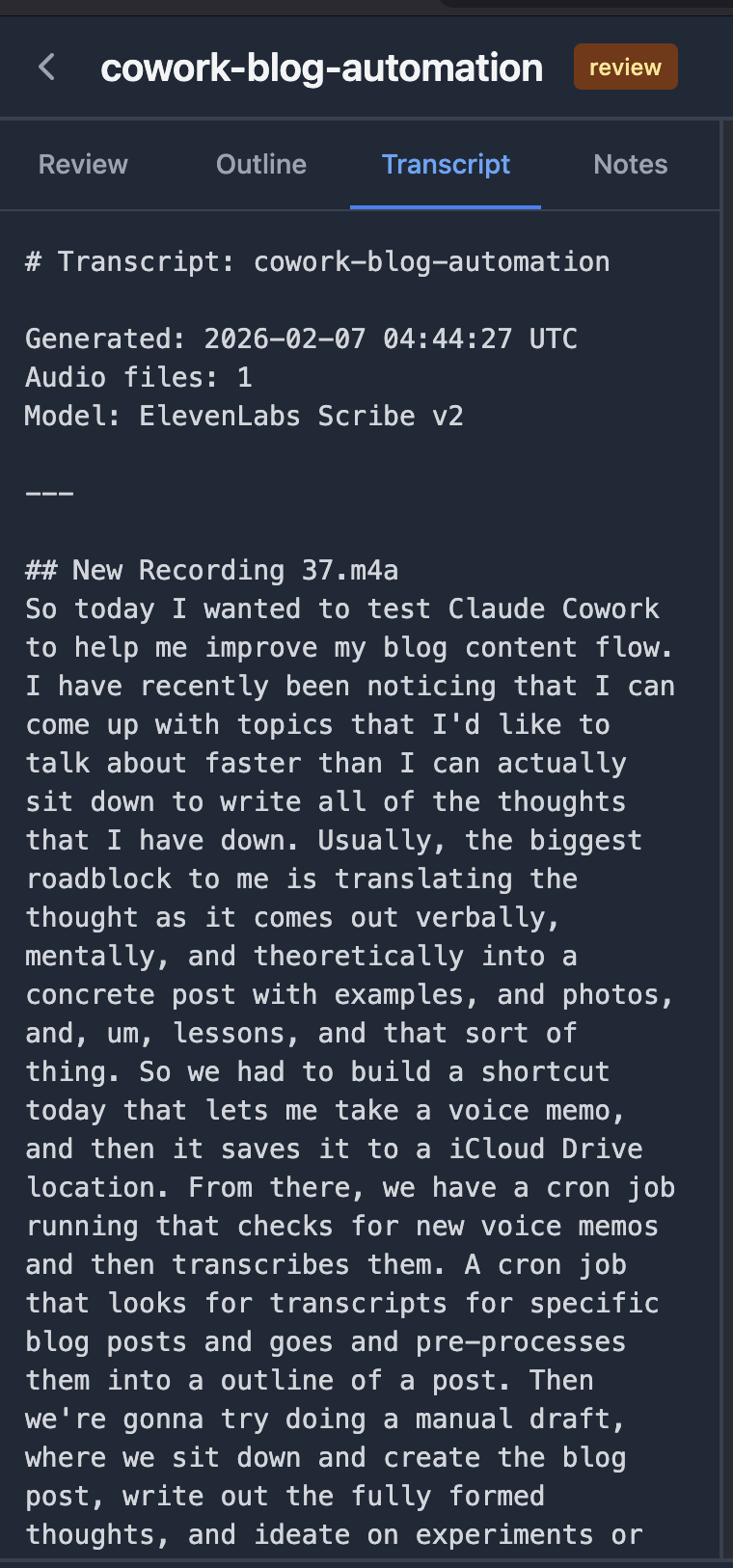
Transcript from ElevenLabs Scribe v2
Step 3 — Preprocess: Next we have another cron job that finds transcripts for specific blog posts and automatically starts preprocessing with the Claude CLI to generate an outline. You’ve been able to run claude in the background like this for about a year, but this is my first automated use of it. The price per capabilities should again see at least a 10x improvement over the next year so even if we need to switch to an API it should again be cents or fractions of cents per post.
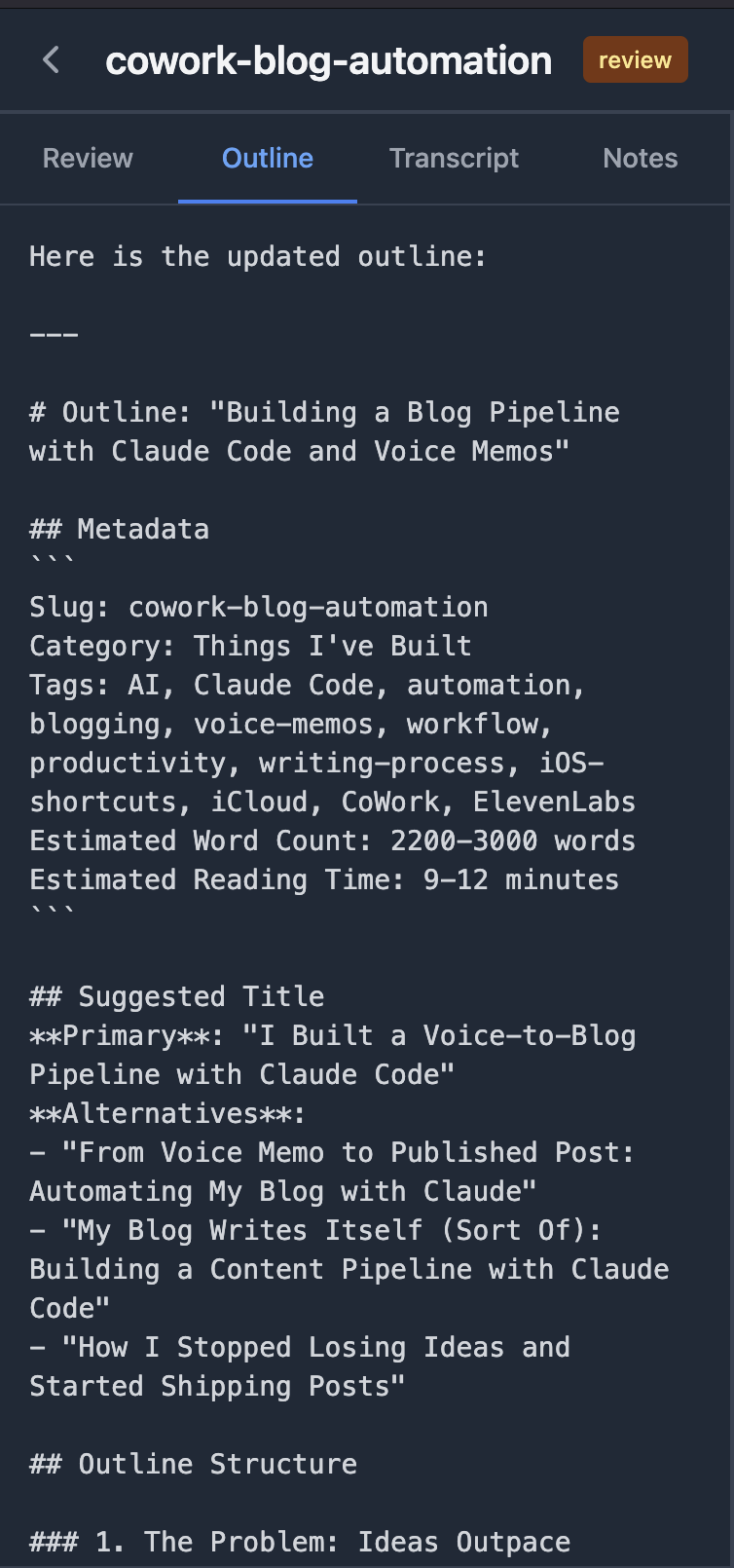
Outline generated by Claude CLI
Step 4 — Manual Draft: This is the part I’m working on now (well, the now when I write this, not the now when I post this, or the now when I review this). Here I sit down with the generated outline and write the first draft of the post. I clarify further what I’ve learned and what I’d like to say, armed with a structure that was laid out from a series of voice memos. Often this turns into a very different post than the one that I had started with as the process of writing / editing my thoughts forces me to probe my understanding to make sure I communicate clearly what I mean.
Step 5 — Post-processing: Now that I’ve written the first draft (different now than before), I am working with a review agent to review the content for clarity, grammar, and spelling mistakes. It goes through the post looking for claims I make to make sure they are substantiated and references are provided. It catches when I try to slip a run on sentence in and helps point out when I need to rework a section.
Step 6 — Iteration: Then we go through the regular edit/review/rewrite process for posts, hopefully this will speed up as I practice more and the initial drafts start closer to final drafts.
For what I described above I worked through Claude Cowork to build the scripts and provide the commands to setup the sync and preprocessing jobs. I’ll go into a bit more detail on that process below because it was both magical and frustrating at times.
This post is actually the first test of this process, everything I’ve talked about was first spoken into a voice memo, copied + transcribed, and then drafted to an outline. Like I mentioned before, I had some friction with the iOS shortcut where I realized we need a better way to select the post folder than a simple text input. This is still a todo item.
One thing I hope you take away from this is you can just ask for software with the latest version of AI tooling. Every time I run into a point of friction I’m a prompt or three away from removing the problems. For example, I noticed when it was time to work on the first draft that it would be good to have an editor with access to my notes / outline / transcripts, so I had Claude Code build one (granted I then spent a few hours iterating on it to fix all the bugs/feature requests). Then when I noticed I was taking screenshots and didn’t have a quick way to put them into my draft, we added a feature for that! Right now this still requires a bit of know how on my end, but by the end of 2026 anyone should be able to get these kind of results with a short tutorial.
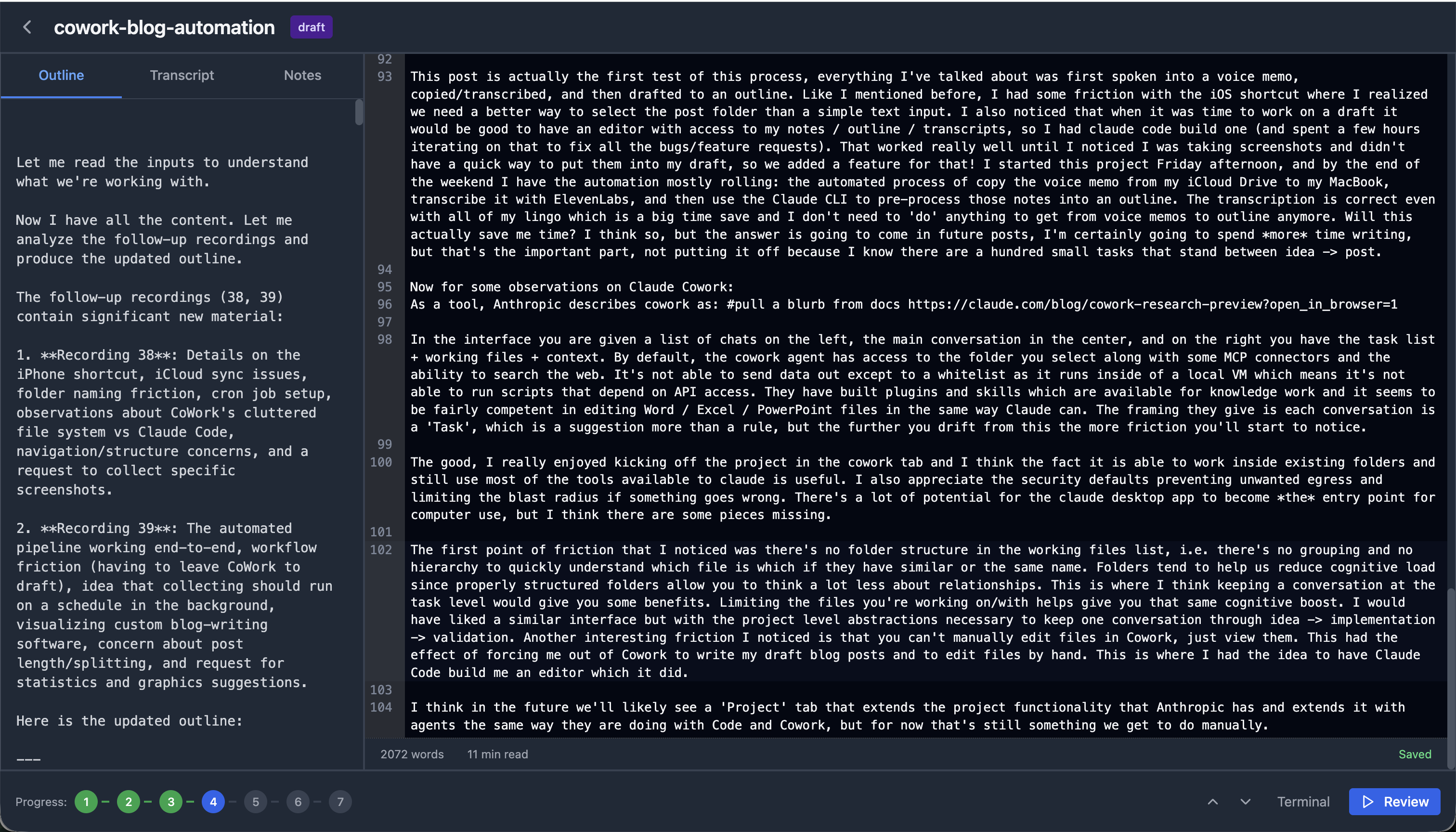
Custom blog editor built with Claude Code
I started this project Friday afternoon, and by the end of the weekend I have the automation running like I’d expect: the automated process of copying the voice memo from my iCloud Drive to my MacBook, transcribing it with ElevenLabs, and then using the Claude CLI to pre-process those notes into an outline works. The transcription is correct even with all of my lingo which is a big time save and I don’t need to ‘do’ anything to get from voice memos to outline anymore. Will this actually save me time? I think so, but the answer is going to come in future posts, I’m certainly going to spend more time writing, but writing is the important part, and I no longer have the excuse to put it off because I know there are a hundred small tasks that stand between idea -> post.
Now for some observations on Claude Cowork:
In the interface you are given a list of chats on the left, the main conversation in the center, and on the right you have the task list + working files + context. By default, the cowork agent has access to the folder you select along with some MCP connectors and the ability to search the web. It’s not able to send data out except to a whitelist as it runs inside of a local VM which means it’s not able to run scripts that depend on API access. They have built plugins and skills which are available for knowledge work and it seems to be fairly competent in editing Word / Excel / PowerPoint files in the same way Claude can. The framing they give is each conversation is a ‘Task’, which is a suggestion more than a rule, but the further you drift from this the more friction you’ll start to notice.
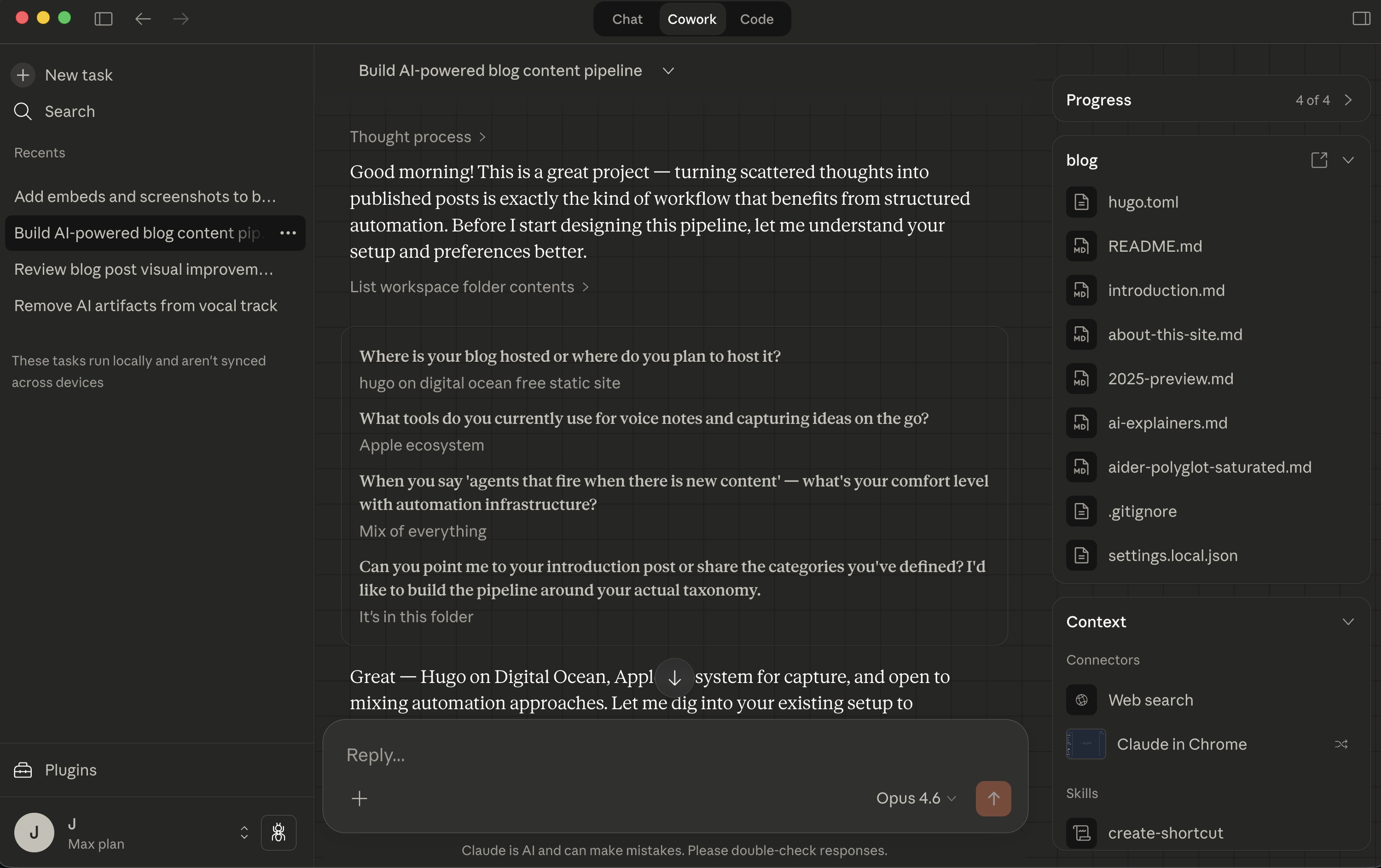
Claude Cowork editor interface
The good, I really enjoyed kicking off the project in the cowork tab and I think the fact it is able to work inside existing folders and still use most of the tools available to claude is useful. I also appreciate the security defaults preventing unwanted egress and limiting the blast radius if something goes wrong. There’s a lot of potential for the claude desktop app to become the entry point for computer use, but I think there are some pieces missing.
The first point of friction that I noticed was there’s no folder structure in the working files list, i.e. there’s no grouping and no hierarchy to quickly understand which file is which if they have similar or the same name. Folders tend to help us reduce cognitive load since properly structured folders allow you to think a lot less about relationships. This is where I think keeping a conversation at the task level would give you some benefits. Limiting the files you’re working on/with helps give you that same cognitive boost. I would have liked a similar interface but with the project level abstractions necessary to keep one conversation through idea -> implementation -> validation. Another interesting friction I noticed is that you can’t manually edit files in Cowork, just view them. This had the effect of forcing me out of Cowork to write my draft blog posts and to edit files by hand. This is where I had the idea to have Claude Code build me an editor which it did (see below). Here again I found myself hitting some friction, I had the editor project started in Cowork and I wanted to use full Claude Code to work on implementing features and fixing bugs, but there is no ’transfer’ to Claude Code option for conversations. Instead I had to have it create project docs in the file system and then load those into claude code when I launched a new session there.
I think in the future we’ll likely see a ‘Project’ tab that takes the project functionality that Anthropic has and extends it with agents the same way they are doing with Code and Cowork, but for now that’s still something we get to do manually.
Unless…
[to be continued]